Early access · macOS · Windows · Linux
Your own cloud, on your computer.
Linux and Windows sandboxes, Kubernetes clusters and managed databases, made in a minute and run on your own machine. One console on Mac, PC and Linux, and a private network that joins them.
macOS 14+ on Apple silicon · Windows with Hyper-V · Linux with KVM (preview)
A cloud you don't pay by the hour
Machines, clusters and databases that behave like a cloud's, on the hardware you already own. Nothing leaves your computer unless you send it.
One console, three systems
The same app and the same features on a Mac (Apple Virtualization), a PC (Hyper-V) and Linux (KVM). Copy a sandbox from one to the other with its work.
Disposable by design
Instant snapshots, clones and machines that reset at every stop: try anything, break anything, come back in a click.
Everything in one search
Sandboxes, images, clusters, Kubernetes objects and the files inside them, found from one box, with filters and examples.
What it does
Everything a cloud gives you, on your own machine.
Machines, networks, Kubernetes and databases, managed from one console, with a CLI that does the same.
Linux and Windows sandboxes
Seven distros and Windows 11, set up once unattended, then copied in a minute.
Snapshots, clones, disposable
Instant snapshots, clones with their own identity, machines that reset at every stop.
Networks you choose
Internet, a private network, this computer only, offline, or a named network shared by a group.
Kubernetes clusters
Multi-node k3s from sandboxes in a minute, with Helm, manifests, usage and a network report.
Managed services
Postgres, MariaDB, Redis-compatible caches, object storage, queues and a registry, with backups.
Across your computers
Pair a Mac and a PC: copy sandboxes, share a private network, run one cluster on both.
Search everything
Sandboxes, images, clusters, Kubernetes objects and the text inside files, from one box.
Your other clusters too
Docker Desktop's, minikube, kind or k3d clusters show up and are managed the same way.
The console
See it before you try it.
Real screens of the app, with made-up sandboxes.
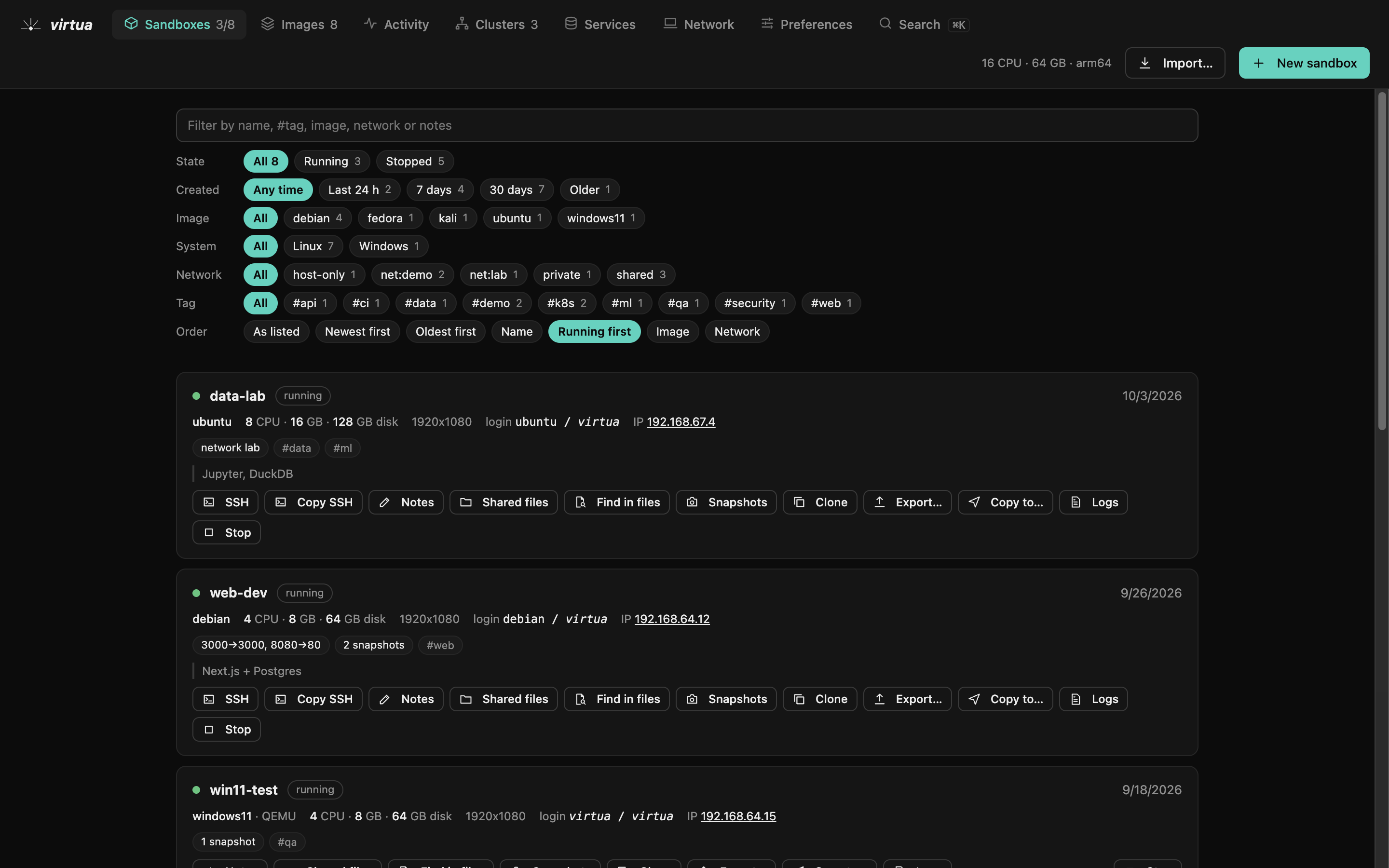
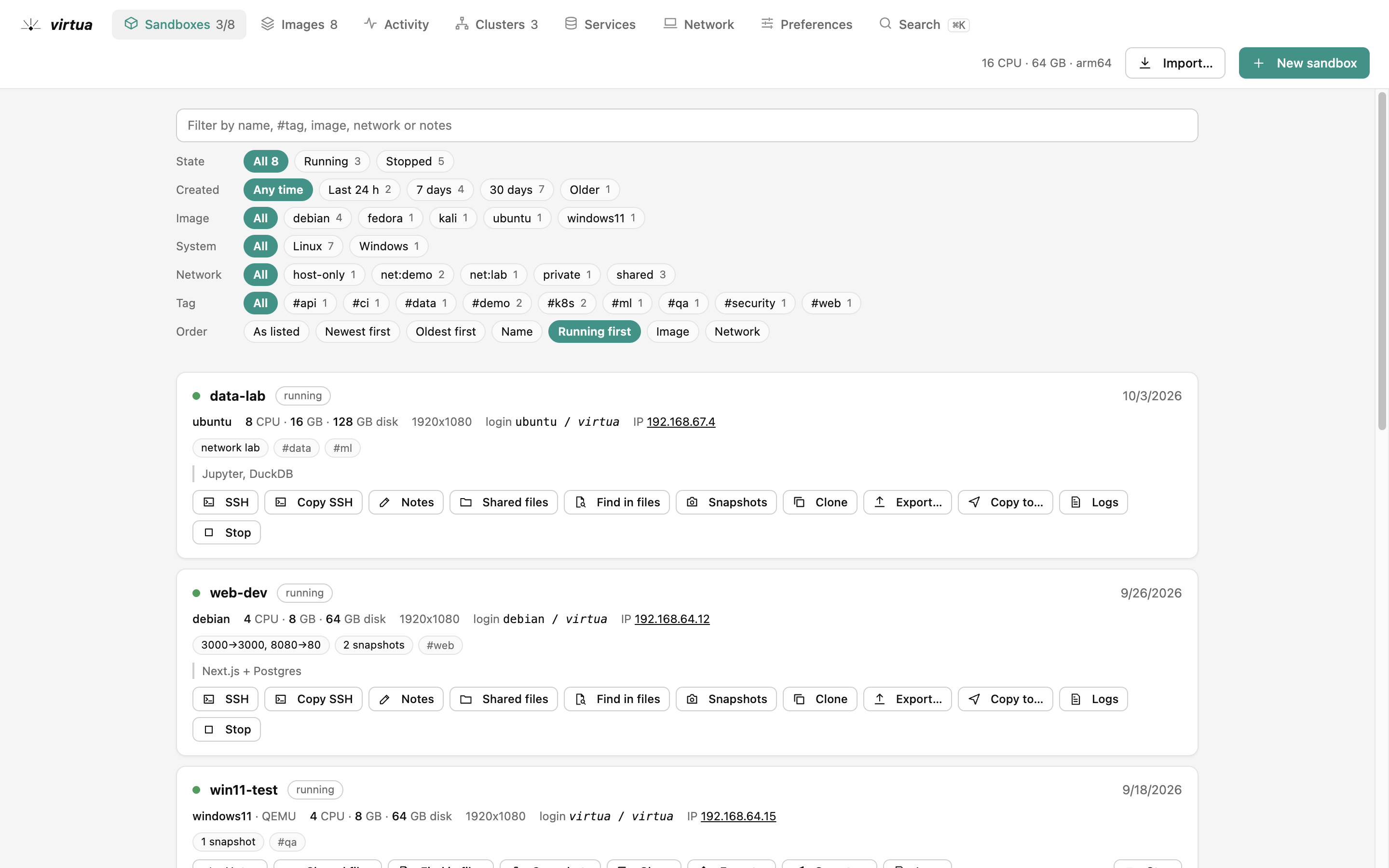
Every machine with its state, image, network and ports; filters as buttons, actions one click away.
How it works
From nothing to a platform in three steps.
01
Pick an image
Debian, Ubuntu, Fedora, Rocky, Alma, Kali or Windows 11, set up once unattended. Every next sandbox is a copy: a minute, not an install.
02
Shape it
CPUs, memory, disk, a desktop or none, ports, a shared folder, and the network it may see: the internet, this computer only, or nothing at all.
03
Grow it into a platform
Turn sandboxes into a Kubernetes cluster, add a managed Postgres or Redis, join a PC's sandbox to your Mac's cluster. All from the same console.
Made for
People who build, test and teach.
Developers
A real Linux box per project, Kubernetes like production, databases with backups, ports on localhost.
Platform engineers
Multi-node k3s clusters in a minute, Helm and manifests, usage per namespace, a network report per node.
QA and security
Windows 11 and Kali on demand, offline or isolated networks, disposable machines that reset at every stop.
Teachers and students
The same lab on every machine of the class, exported as one file and recreated anywhere.
Runs on
The same console on three systems.
macOS
Early accessApple Virtualization framework
- · macOS 14 or later on Apple silicon
- · Windows guests through QEMU (Homebrew qemu)
Windows
Early accessHyper-V
- · Windows 10 or 11 Pro, Enterprise or Education with Hyper-V
- · Administrator rights once, for the firewall rules between computers
Linux
PreviewQEMU + KVM
- · x86-64 or arm64 with /dev/kvm
- · Debian, Ubuntu, Fedora / RHEL, Arch or openSUSE
- · No Windows guests yet
Pricing
Free during early access.
Every feature, on every computer, at no cost while virtua is in early access. When the paid plans start, early users keep Pro free for a year.
Questions
Good to know.
How is it different from Docker?
Docker runs containers, sharing one kernel. virtua runs whole machines: your own kernel, a desktop if you want, Windows 11, systemd, a firewall, and real isolation between them. Kubernetes clusters are made of those machines, like real nodes. And virtua shows the clusters Docker Desktop runs too.
Does anything run in the cloud?
No. Sandboxes, clusters, databases and backups run and stay on your computers. Two of your computers talk to each other directly, encrypted, after you pair them; nothing goes through our servers.
Which systems does it run on?
macOS 14 or later on Apple silicon, Windows 10 or 11 Pro, Enterprise or Education with Hyper-V, and Linux with KVM (in preview).
How much memory do I need?
A Linux sandbox without a desktop runs well in 1 to 2 GB, a desktop in 4 GB, Windows 11 in 8 GB, a small cluster in 5 GB. The Activity tab shows what each one uses and warns when your computer runs short.
Can I move a sandbox from my Mac to my PC?
Yes: pair the two computers, then Copy to… on the sandbox. It is rebuilt from the same image on the other side (arm64 or x64) and its work restored: home folder, Kubernetes apps and their data, shared folder.
Is my data safe?
Everything stays on your disks. Pairing uses a code shown on one computer and typed on the other; traffic between paired computers is encrypted with a key only they know.
When is the public release?
virtua is in early access: ask for it by e-mail and we'll send you the build for your computer. Signed installers and automatic updates are next.
Build your own cloud this afternoon.
Tell us which computer you use; we send you the build.